Posts|Comments

Category Archives: Free software reviews

MP3 Gain [free software review]

I have a whole lot of (legal) music on my computer.  For the most part, we left out CDs and cassettes (remember those?) and LPs (yikes!) back in Canada and just brought the music in MP3 format on our hard drive.

This means that we can technically play most of the music we’ve ever owned randomly (not that we do that exactly, but we do play large collections on "random").  That’s all very well and good, but as you well know recording quality varies, and some recordings are set at a much LOUDER volume than others.  So you can be listening to one song just fine, and the next might BLAST you out of your seat!

Software developers, who also occasionally listen to music, came up with volume normalization, which attempts to keep your music from drastically changing decibels from track to track.  But there are problems with this too.  For one thing, it can slow down the program you’re using.  You may also use more than one program, and each one must normalize the volume.  Finally, many programs have trouble understanding how the human ear hears the song, and so the results that come out of your speakers are far from perfect.

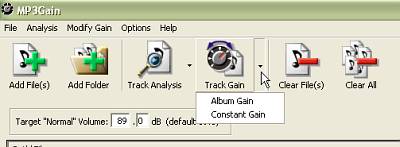
One of the most perfect solutions out there is a program called MP3Gain.  MP3Gain simply normalizes the volume of MP3 tracks, but it attempts to adjust how the track actually sounds to the human ear.  The results are far better.

MP3Gain

The other main advantage to MP3Gain is that it doesn’t degrade your files - you can change the volume as much as you like, and then put everything back the way it was, no problem.

You can also maintain the volume difference between songs in a single album, and yet lower the general volume of each album.

The only complaint I have is that the setup is a little confusing at first.  But there’s a help file, and once you figure it out it’s very quick to set up and very simple - you basically press a button to analyze your MP3s, and another button to normalize the volume.  All done!  Go listen to some music!

The program is free, of course, under the GNU General Public License.  It was developed by Glen Sawyer.  It’s available in a number of languages, including Spanish, French, Japanese and Uzbek.  If you listen to music via MP3 on a regular basis, this is a must have program.  Go to the MP3Gain download page and grab yourself a copy.  MP3Gain for Mac is available here.

Popularity: 11% [?]

Winamp - free music/video software

Winamp full

Time for another free software review! This is one of those programs that I consider almost essential. It’s a program that is running on our computer almost every day. And yet, as I was writing this post, I discovered more things it could do that I didn’t even know about!I realize most of you already know about Winamp. After all, the Winamp website is listed by Alexa as the 708th most popular site on the net - that’s huge in internet terms. But for those of you who still don’t know about it, or haven’t thought about it in a while, it’s time to give it a chance.

Essentially, Winamp is a program that allows you to watch video and listen to audio, much like Windows Media Player. Created by Justin Frankel many years ago (and since developed by many), the program does what it does with style. You can listen to CDs, to MP3s, even to streaming audio off the internet (and you can even do it on a dial-up connection in many cases). You can listen in sequential order, or random order, or make your own order. You can watch video full screen or in a little box. You can watch pretty flashing lights while the music plays.

winamp bar
Winamp can be just a small bar on the top of your screen

One of Winamps fine features is its ability to use skins (changing the look of the player, and even how it functions) and plugins (basically to add functions). There are many skins based around movies, products, or just aesthetic appeal. You can always change the colour to match your desktop. And the plugins are endless. I found a great one recently. Since we’re often playing music in the house, we’ve found ourselves rushing for the volume control when the phone rings. No problem - I found a plugin that automatically turns the volume down when someone calls. How cool is that?Let’s see, what else? Well, there are many radio stations available from all over the world that you can listen to on Winamp (many listed on Shoutcast.com, but also listed within the player). That goes for video streams too. You can also listen to AOL radio on Winamp, among other things.

I set up a little menu on the bottom of my screen with playlists of the music I have on my computer. With a couple of clicks I can play all the music I have by one artist, or play a certain theme, or just play kids music. This is the beauty of Winamp playlists.

A pay-for version, which I haven’t tried, also allows you to convert music into MP3 format.

That’s just a hint of what you can do with Winamp. Perhaps its biggest problem is that there is just so much you can do with it - you’ll never finish checking out all the features, plugins and skins. But in the mean time, just download it, stick in a CD, and press play. You can learn from there.

Popularity: 81% [?]

CoolRuler [free software review]

CoolRuler

CoolRuler is one of those little programs that every once in a while makes something a whole lot easier.  The concept is quite simple, really.  CoolRuler is a little ruler that appears on your screen.  It can be horizontal or vertical.  It can measure in centimeters, inches, pixels, or a custom measurement.  You can move it around the screen and put little marks on it just where you want them.

There are all kinds of reasons why you might want to use something like this.  If you’re working with graphics online or emailing to a friend, you might want to measure how big the picture should be.  If you’re writing an academic paper, you might want to see just how big those margins really are.  Anything that’s going to stay on your computer, or be printed out, might need to be measured with CoolRuler.

Sure, you may not want it now, but the day will come when you’ll remember what I said and go looking for it.  So why not just get it now?  It’s a tiny program available from FabSoft.  Click here to go to the CoolRuler download page [edit: looks like the link is no longer available. Sorry! Contact me if you’re interested in Cool Ruler.].

Popularity: 13% [?]

Dictionary/thesaurus - WordWeb [free software review]

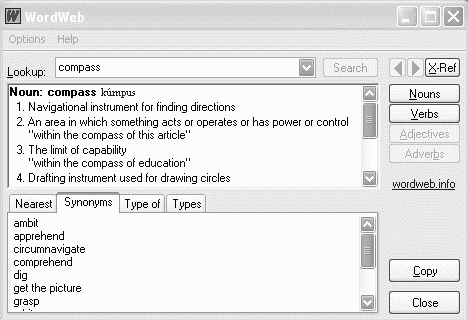
WordWeb 3.03

Some of the applications I use have a spell checker.  Some don’t.  And even when they do, they certainly don’t have all the words I need.  And what if I want a definition?

No problem.  All I have to do is highlight the word and click [Ctrl]-[Alt]-[W].  Low and behold, up pops the definition, and synonyms to boot.  It will even tell me how to pronounce the word - and believe it or not, that comes in handy sometimes.

Even more amazing, WordWeb will differentiate between Canadian, British and US spellings.  Now at last I can spell colour my favourite way!  It’s not exactly a spell-checker, but I use it to check spelling often.  It does give suggestions of “close” words, and it’s lightening fast.

If the definition doesn’t appear, I can click the link and it will automatically find a definition on the web.  Pretty smooth.

The program is called WordWeb.  WordWeb is free for personal, non-commercial use, and only US$19 for the Pro version, in which you can add your own definitions, solve anagrams, and do wildcard searches.  WordWeb will even work on Windows 95.

By the way, I would be remiss if I didn’t mention the nifty dictionary I used long before WordWeb.  This one just uses online information, unlike WordWeb which has a built in dictionary.  It’s called the Magical Jellybean Dictionary.  But I prefer the offline abilities and speed of WordWeb.  The nice thing is the ability to press the keys from any application and get it to bring up the word.

WordWeb - dictionary, thesaurus, all at the push of a button.  Visit their website now to get yourself a copy of WordWeb, free!

Popularity: 39% [?]

  • Posts Jim is reading...

  • From Hannah & Nathanael's Wish List

Bad Behavior has blocked 1042 access attempts in the last 7 days.