
Dictionary/thesaurus – WordWeb [free software review]
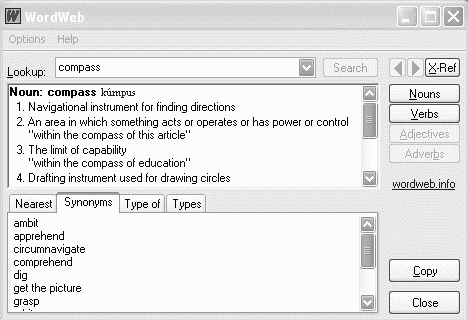
Some of the applications I use have a spell checker. Some don’t. And even when they do, they certainly don’t have all the words I need. And what if I want a definition?
No problem. All I have to do is highlight the word and click [Ctrl]-[Alt]-[W]. Low and behold, up pops the definition, and synonyms to boot. It will even tell me how to pronounce the word – and believe it or not, that comes in handy sometimes.
Even more amazing, WordWeb will differentiate between Canadian, British and US spellings. Now at last I can spell colour my favourite way! It’s not exactly a spell-checker, but I use it to check spelling often. It does give suggestions of “close” words, and it’s lightening fast.
If the definition doesn’t appear, I can click the link and it will automatically find a definition on the web. Pretty smooth.
The program is called WordWeb. WordWeb is free for personal, non-commercial use, and only US$19 for the Pro version, in which you can add your own definitions, solve anagrams, and do wildcard searches. WordWeb will even work on Windows 95.
By the way, I would be remiss if I didn’t mention the nifty dictionary I used long before WordWeb. This one just uses online information, unlike WordWeb which has a built in dictionary. It’s called the Magical Jellybean Dictionary. But I prefer the offline abilities and speed of WordWeb. The nice thing is the ability to press the keys from any application and get it to bring up the word.
WordWeb – dictionary, thesaurus, all at the push of a button. Visit their website now to get yourself a copy of WordWeb, free!